Stop retyping RFPs and carrier quotes from email
Connect your Gmail inbox. Bidi AI reads each customer RFP and carrier reply, attachments included, and turns it into lanes and rates your team checks before anything is used.
Northbay Foods pricing team
Northbay Foods Q1 import RFP
Northbay Foods Q1 import RFP
New| Origin | Destination | Cntrs | Unload |
|---|---|---|---|
| All Los Angeles / Long Beach | Ontario, CA 91761 | 120 | Live |
| All Los Angeles / Long Beach | Fontana, CA 92335 | 80 | Drop |
| All Savannah | Atlanta, GA 30336 | 60 | — |
2 more lanes
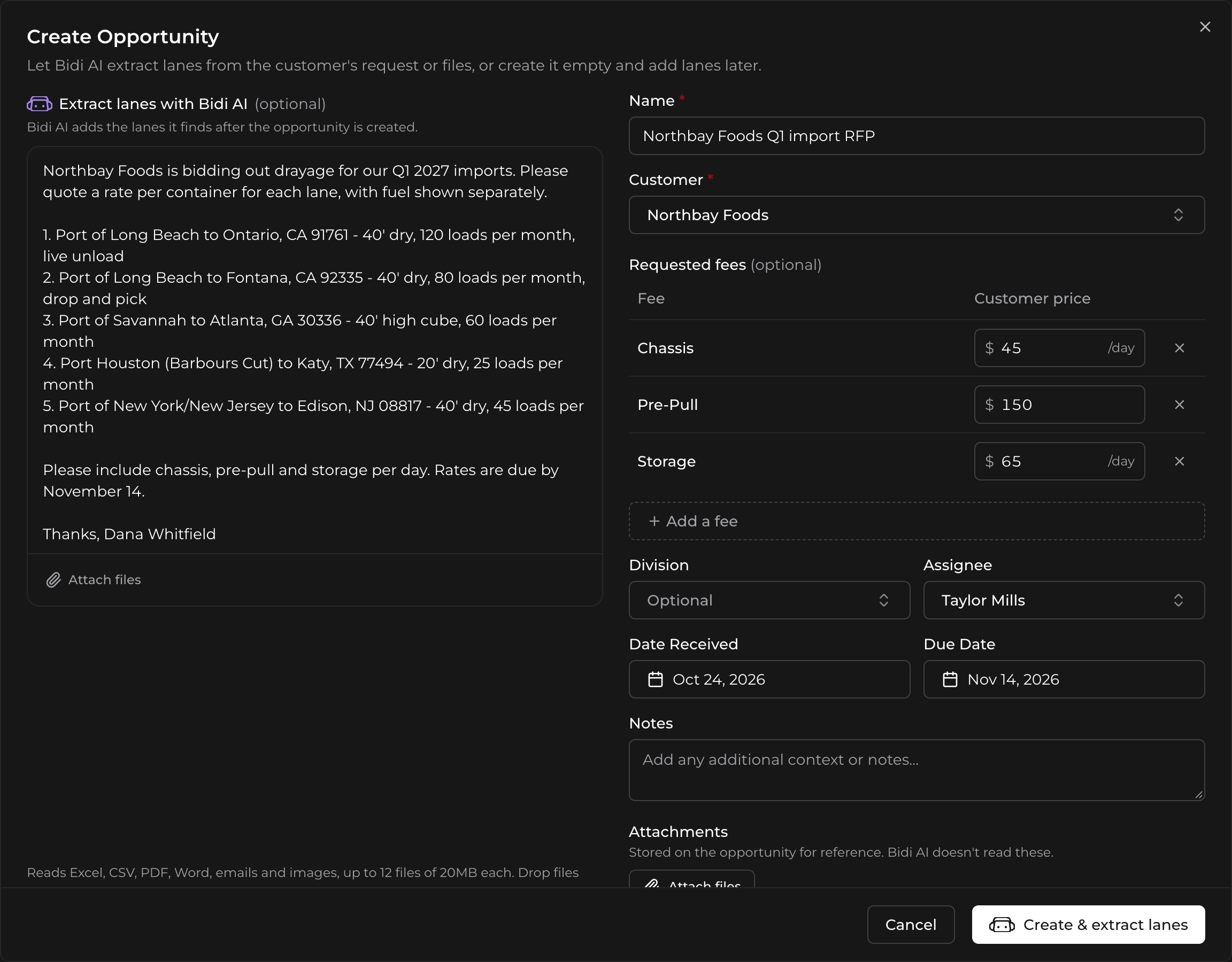
Customer RFPs become new opportunities
BidSource checks your connected inbox every minute. When an email is a pricing request, Bidi AI finds or creates the customer, opens a new opportunity named after the subject, and reads the due date when the email gives one. From the email and up to 12 attachments, it reads:
- The port, rail ramp or market and the door’s city, state and ZIP code for every lane, in the US, Canada and Mexico, with a named terminal placed on its whole market, so LBCT becomes All Los Angeles / Long Beach
- Container counts and whether each load is live or drop
- Notes on equipment, weight, hazmat and delivery address
- From an Excel RFP, the fees the customer wants priced and the sheet they want filled in with your rates
When an email has more than 12 attachments, Bidi AI reads the spreadsheets first and signature images last, and the opportunity lists the files it left out, with the reason.
Once the lanes are in, BidSource matches buy rates from your carrier history on its own, the same way Match buys does.
Later emails in the same thread land in the opportunity’s conversation, and their files are saved to the opportunity, so the whole exchange stays with the bid. Update with Bidi AI reads them and lists the new and changed lanes for you to review before anything changes.
The sender hears back in their thread
As soon as BidSource picks up a request, it replies in the sender’s email thread to say the request is being processed. Once the opportunity is ready, a second reply lists the customer, due date, lanes added or skipped and files read, with a link to open it.
Carrier replies become rates you approve
Rate requests sent from BidSource carry a reply address tagged with the lane. When a carrier answers by email, Bidi AI reads the message and its attachments. It files the rate, updates it if the carrier corrects it in the same thread, or marks the lane declined. It picks up:
- The base rate, the fuel surcharge as a percentage or a dollar amount, and accessorials from your fee list
- Rates for each terminal, the expiration date and live or drop
- Conditions, saved as notes, with the email and its files attached to the rate
Every rate Bidi AI files starts as pending approval. Nothing is used until someone on your team approves it.
See where each value came from
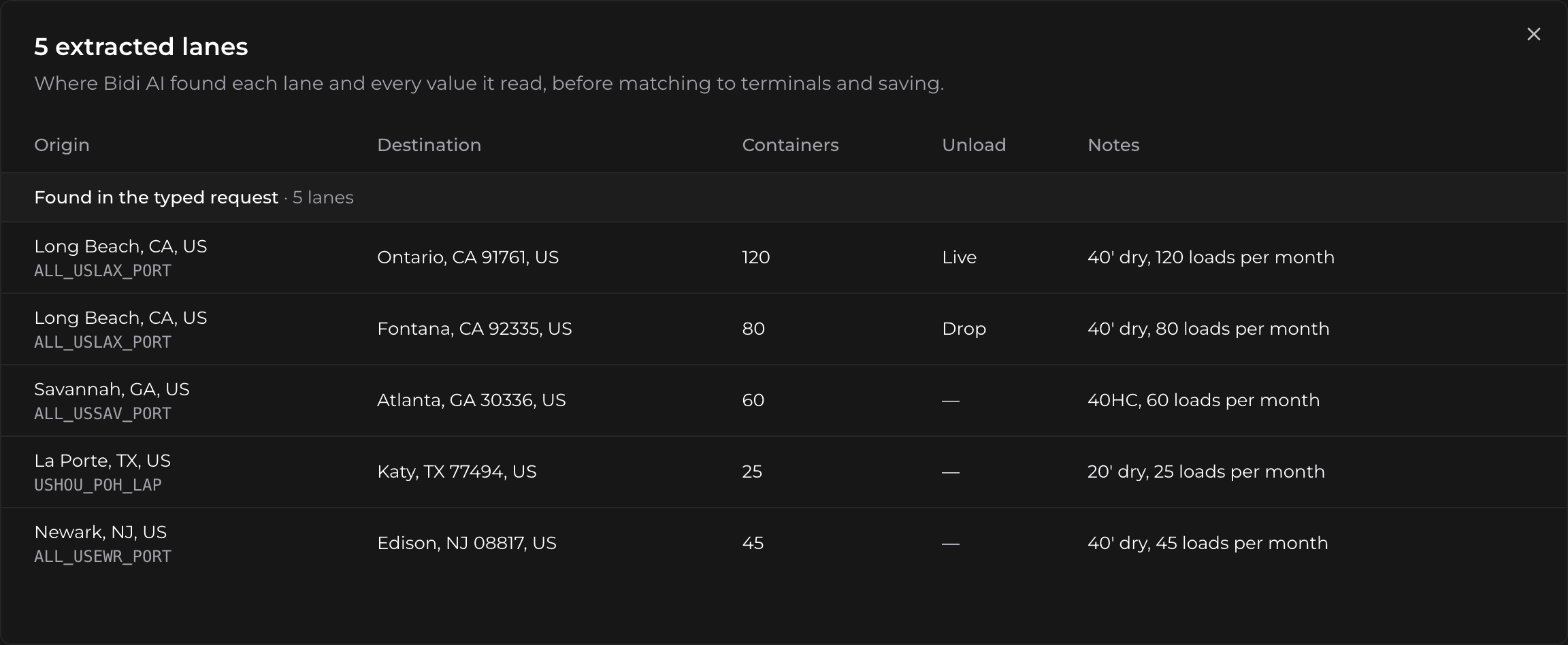
Beside each lane, container count and unload type Bidi AI fills in, and each base rate, fuel surcharge, fee and expiration date it reads from a carrier reply, View source shows the exact text and the file it came from. It flags quoted text it can’t find in the email, and marks text read from a PDF or image as not checked.
Import a rate sheet that came some other way
Import it from Rate Tracking: upload one Excel, CSV, PDF, Word, image or saved email file of up to 20 MB, pick the carrier, review the lanes Bidi AI found, then create the rates.
What Bidi AI reads
- Spreadsheets
- Excel (.xlsx, .xls, .xlsm) and CSV
- Documents
- PDF and Word (.docx)
- Images
- Photos and screenshots: PNG, JPG, WebP, GIF, HEIC
- Emails
- Attached emails saved as .eml, .msg or .oft
- Web and text
- HTML and plain text
Gmail and Google Workspace inboxes connect directly. Emails from Outlook can be read when they are attached as saved .msg files.