Price every drayage fee the same way, every time
Write a rule once for chassis, pre-pull, detention or any of 61 accessorials, for a customer, carrier, division or lane. Fuel surcharges can follow the weekly EIA diesel price, and you set your margin lane by lane or fee by fee.
Northbay Foods
Customer rule
- Pre-Pull
- $150
- Chassis
- $45 / day
LA / Long Beach → Inland Empire
Lane rule
- Chassis
- $40 / day
- Pier Pass 40
- $75
West Coast
Division rule
- Detention
- $85 / hr
- FSC
- DOE U.S. diesel bands
A rule for each way you price
An accessorial rule lists the fees it prices and who it applies to: a customer, a carrier, a division, an origin or destination terminal or market, or any mix of them. Leave a field blank and it applies to all.
Price each fee on the buy side, the sell side or both, as a fixed amount or as an amount added to the buy price, and give the rule the dates it is in effect. Rules apply to rates priced from then on. Existing rates keep their prices, and a stale badge shows where a rule has changed since. Fuel is the exception: open buy rates follow their fuel rule, and a bid fuel schedule reprices fuel on that bid’s sell rates that aren’t live yet.
A rule sets what a fee is worth. On a new sell rate, only the base rate and fuel count in the total until you include the other fees.
The most specific rule wins
When several rules cover a rate, BidSource decides fee by fee:
- A bid’s own fuel schedule beats every other rule for that bid’s sell fuel
- A customer rule beats a lane rule
- A lane rule beats a carrier rule
- A carrier rule beats a division rule
- Within a lane, a terminal beats a market, and the origin beats the destination
If the winning rule leaves a fee empty, the next rule down prices it.
Fuel surcharges from the weekly diesel price
Create a fuel index that pulls the EIA/DOE No. 2 diesel price every week, for the U.S. average, a PADD region or California, or enter the price yourself.
In a rule, set fuel as a flat percentage, or as bands that move with the index, which you can import from a CSV or Excel file. The fuel surcharge is charged as a percentage of the base rate.
When a customer asks for different fuel terms on one bid, give the bid its own fuel schedule. It prices that bid’s sell rates without changing the customer’s other bids, and you can make it the customer’s schedule from a start date you choose.
Price a bid lane fee by fee
Pick the carrier’s buy quote, then set the sell one fee per row, next to the carrier’s buy and the difference. Apply one margin or markup to the lane or a different one to any fee. Fuel stays at the carrier’s percentage unless you change it, and marked-up prices round to the nearest dollar by default.
Set a margin goal for the company, or a different one for a bid. Each lane with a customer quote shows the most you can pay a carrier and still hit it, and margins below the goal are flagged.
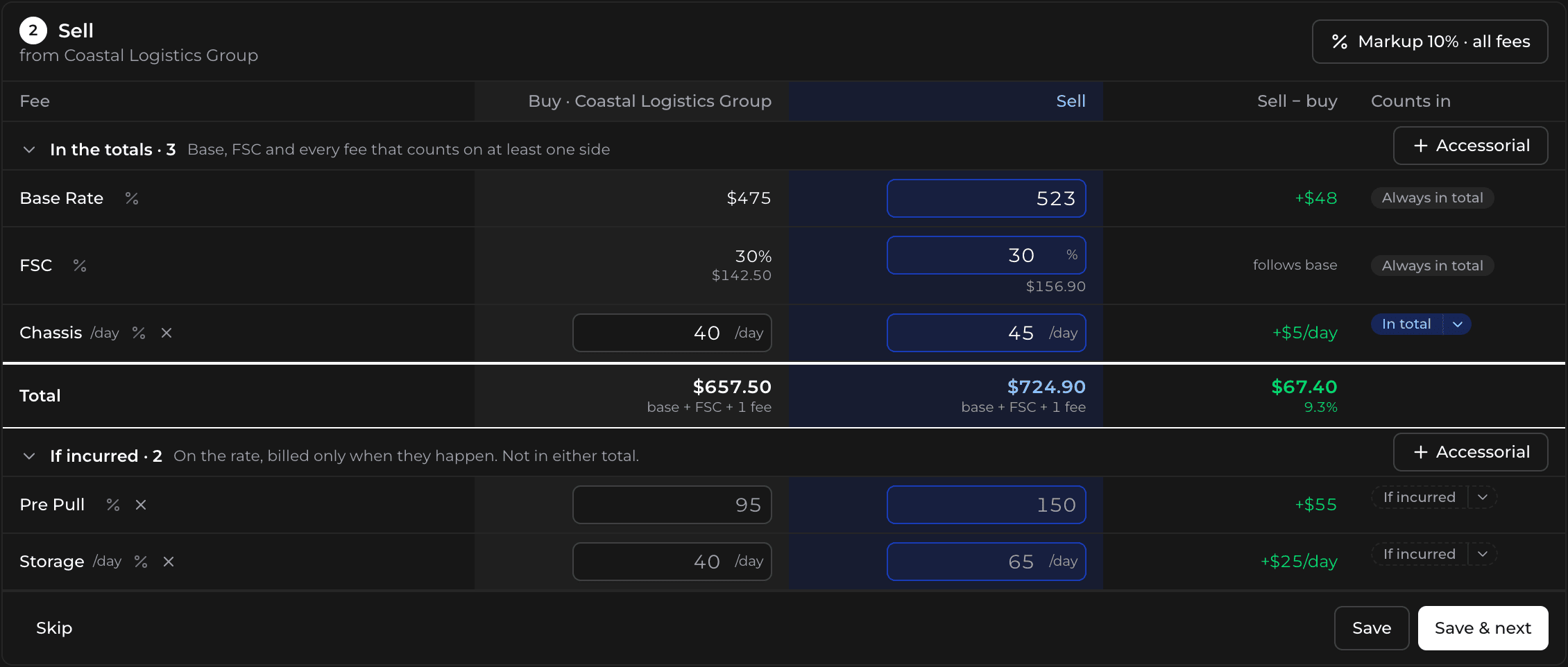
Build the sell quote
The Sell Side Builder takes the buy rates you pick, one per lane, fills the sell fees from your rules and adds your margin to the base rate and fuel. Send the quote to your customer’s email or download it as a PDF.
Carriers send you accessorial price lists too. Import one as a PDF, Excel or CSV file, and Bidi AI reads the amounts into a rule and lists the lines it could not match.